Possible ways to redirect content

Redirects are a recurring topic within technical SEO, and the truth is that websites are not static — they grow, change, evolve, and eventually their URL structure and final pages also change.
This is why, for user experience reasons, redirects must be implemented despite those URL changes. However, for various reasons, the redirects we create, how we create them, and the implementation method can affect our search engine rankings.
Since there are many variables, I’m going to establish different classifications and what should or should not be applied in each case.
We must understand what type of redirect we are dealing with.
In general, a permanent redirect is understood as a way to move content definitively to another URL, while a temporary redirect is used when, for some reason, that URL is temporarily unavailable and the content is sent somewhere else.
If the redirect is temporary, Google systems will treat it as a weak indicator that the new page (the final destination page) is canonical (the one that appears in search results), while a permanent redirect is a strong indicator that the final page is canonical.
This is what Google’s own documentation states, but let’s break it down.
The real effect of a temporary redirect is that the old URL will remain in Google’s index a bit longer than with a permanent redirect, but in both cases Google will eventually treat the final URL as the destination URL.
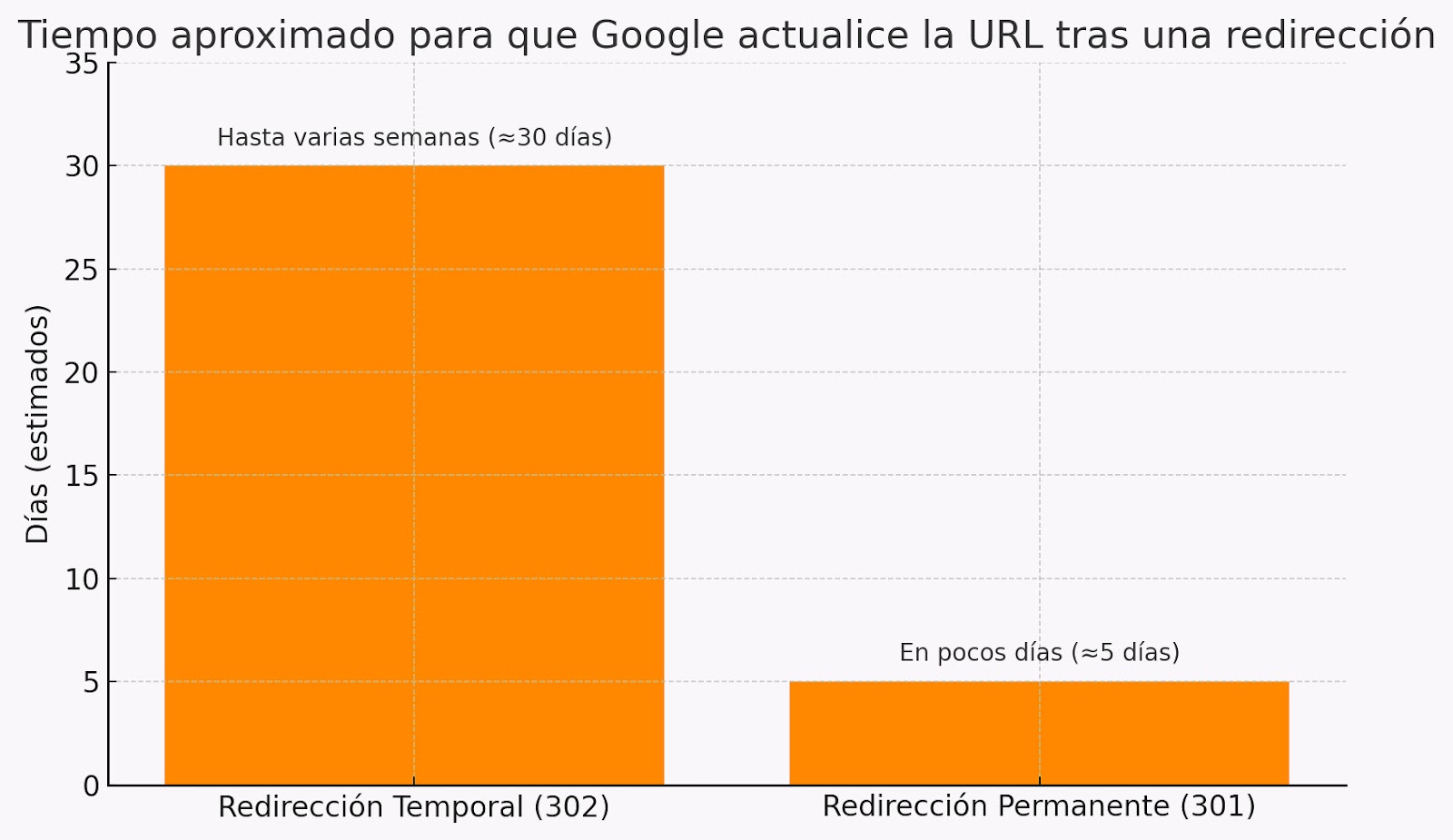 Bar chart comparing the estimated time it takes Google to update a URL after a redirect. A temporary redirect (302) takes several weeks (approximately 30 days), while a permanent redirect (301) takes a few days (approximately 5 days).
A permanent redirect will make Google take just a few days (between crawling and verifying) to make the change in the SERPs, whereas with a temporary redirect it will still happen but may take anywhere from several weeks to almost a month. Almost like what happens with deindexing when it’s a 4xx or a 5xx.
In practical terms, in most cases there are far better solutions than implementing a temporary redirect, since someone who intends to use a temporary redirect usually does so because they don’t want to modify the original URL that appears in Google’s results.
Depending on the situation, most cases can be resolved with a staging environment and proper planning, without risking undesirable behavior from Google.
In any case, I’m going to help you with a guide to the types of redirects.
| Redirect Method | Description | Type (SEO) | Advantages | Disadvantages |
|---|---|---|---|---|
| Server (HTTP) | Performed by modifying the HTTP header, returning a 3XX status code. | ✅ Highly recommended | • Compatible with all search engines • Immediate and robust • Works for all types of resources (HTML, images, PDFs…) • Does not require loading the content | • Requires server access • Poor implementation can break the website • Not all CMS allow it easily |
| Meta Refresh | Redirection via a meta http-equiv="refresh" tag in the HTML head. | ⚠️ Acceptable with caution | • Can be applied where there is no server access • Simple if you control the HTML | • Only works with HTML • Not suitable for large-scale redirection across an entire site • Requires the page to exist • Slower and less effective than server-side redirects • Requires more knowledge to perform bulk changes |
| JavaScript | Executed through window.location or other JS methods. | ⚠️ Not recommended | • Allows complex and conditional logic • Enables advanced automation | • Requires the page to be renderable • Poor user experience • Not always detected by SEO tools • Doesn’t always execute correctly |
| Canonical (Google only) | Indicates which URL is preferred, although it does not redirect the user. | ⚠️ Complementary | • Useful for consolidating SEO signals • Can be combined with other methods | • Does not redirect the user • Only works if Google interprets it correctly • Does not guarantee indexing of the canonical URL |
| “Crypto” Redirection | Displays a message to the user with a manual link to the new URL (not a technical redirect). | ❌ Not recommended | • Last resort if no technical control is available • Can inform the user | • Not a real redirect • Does not transfer SEO signals • Depends on the user's click |

It is achieved by modifying the HTTP header, that is, the response the server returns to the user before showing the content.
In this case, it will send a response code to the user, and redirects fall within the 3XX range.
Response codes 301 and 308 indicate a permanent redirect, while 302, 303 and 307 indicate a temporary redirect.
These are the response codes that Google will understand and the ones that should be used for redirects. In case anyone has doubts, beyond the classification of permanent or temporary, there is no response code that is “better” than another, and the existence of variations is due to differences between standards and how developers ended up using these codes.
Server-side redirects have several advantages and disadvantages.

As I explained earlier, some systems do not always allow this type of redirect.
There are well-known CMSs like Shopify or builders like Wix that prevent server-side implementations, which puts you at a clear disadvantage and limits your flexibility for SEO purposes.
In this case, you can combine their languages, such as Liquid (in Shopify) or Velo (in Wix), so that under certain conditions a meta refresh tag is inserted.
In the case where you want the meta refresh to be permanent, it must be executed without a countdown, with a 0-second delay, and if you prefer it to be “temporary,” it is recommended to set at least a one-second delay.
In either case, Google still needs to crawl the page and its content, so it is generally not as effective as a server-side redirect.
In fact, the meta refresh belongs to the family of http-equiv, which are essentially meta tags that emulate an HTTP header code, and it is true that as a standard, most browsers interpret them correctly.

Unlike redirectpath, tools like PERSEO may have trouble detecting it.
Through JavaScript you can perform real magic — you can modify the entire DOM of a webpage and change all the content as you wish.
That is, we can modify any element of our website through JavaScript, and in addition, Google reads JavaScript. Wouldn’t it be a good way to redirect?
Careful: LLMs like ChatGPT do not render JavaScript
The reality is that it would only be a good alternative if you are in the same situation where you need the meta refresh, but you also need automations that you cannot achieve through other languages for these redirects, or you do not have the option to edit or insert code in the <head>.
In fact, through JavaScript today, Google can read links via JavaScript when they use onclick, as Javier Morell pointed out. This was a method many SEOs used for link obfuscation because Google was not able to process it.
Having said all this, it is worth asking why it is not a better option than meta refresh, and the truth is that it carries many of the same disadvantages, plus some even more significant ones.
For Google to read JavaScript, it needs to render the URL in order to process it. To render the webpage, it must be the canonical version and must also be indexable. Due to its caching system, Google may perform an additional crawl to process the JS, with rendering being a step that comes after normal crawling.
We might think that with JavaScript, besides doing a location redirect, we could also insert a meta refresh tag in the head and call it a day, but the truth is that, in addition to rendering, the user must also load it. So if with a normal meta refresh the browser must download the HTML file and execute it, with JS it must also process the JavaScript, making it a slower process that may result in a poor user experience — it is even possible for the origin URL to appear before the browser redirects to the final URL (this is, in fact, a manual diagnostic method to detect a JS redirect).
On the other hand, and to conclude, ChatGPT does not render JavaScript, so you would need to add some sort of “prompt mode” indicator for it to work in these cases.
In some cases, the system we are working with will be so restricted that we will have no option to perform an effective redirect. This often happens in “custom-built” websites where all clients use the same template, which is in reality a sort of pseudo-lock-in.
For these situations, the following would be the possible options, unless we can add GTM and use Google Tag Manager to perform a JS redirect.
This is the name Google assigns to it. In reality, it would be an intrusive message notifying the user of the site change, accompanied by a link.
It is not a redirect but simply a visible link across the entire site.

Something that, if it works well, can act as a kind of redirect for Google—although not for the user— is setting the final URL as canonical.
This can be combined with previous methods and, in fact, in debuggers and social media previews, the content of the canonical URL tends to be shown instead of the shared one.
Redirects are a fairly delicate topic on any website and must be handled with great care, which is why I want to address several aspects.
You must have a company-wide standard and documentation about where those redirects are located and how they are managed.
As a project scales and grows, its redirects do as well. And at a certain point, redirects and possible redirect chains can become a bottleneck.
Redirect chains are redirects that lead to other redirects. You must be careful because they can generate a “too many redirects” error or prevent Google from following them.
That’s why, ideally, regardless of how and where redirects are set on a website, everything should be centralized in one place. If redirects are handled on the server, in the .htaccess file, and also in a plugin, it becomes very easy to lose control and even for this poor practice to generate unwanted results on your site.
In summary, it doesn’t matter whether you do it through the .htaccess file, a plugin, or Laravel Forge. What really matters is keeping all redirects in the same place.
In many people’s minds, redirecting the user to the corresponding language version based on the language they enter with may seem like a great idea. However, let’s look at these quotes from Google’s documentation:
If you prefer to dynamically change content or redirect users based on their language settings, keep in mind that we may not find or crawl all your variants. This is because the Googlebot crawler usually comes from the United States. Also, the crawler sends HTTP requests without defining Accept-Language in the request header.
Avoid automatically redirecting users from one language version of a site to another. For example, do not redirect users based on the language you think they speak. These redirects can prevent users (and search engines) from seeing all versions of your site.
Therefore, no: redirecting based on language is not a good idea. It’s better to give users the freedom to choose through a language selector and a proper configuration of hreflang tags.
Sometimes people tend to block by country by redirecting based on IP when working with a site that legally cannot operate in certain countries.
Instead of country-based georedirection—with the possible problem of redirecting Googlebot or a manual reviewer—it’s better to apply techniques such as the paywall Google recommends in its structured data documentation.
However, the best approach would be to follow John Mueller’s advice, which indicates that the proper method is to apply the necessary blocking but whitelist Google’s user-agents and/or their list of IP addresses (if you want greater security), allowing them access to the content.
Here is the full video with the explanation.
Although there is a myth that redirects slow down a website, there are two situations where redirects can actually harm performance.
If a user has to go through several redirects in the same request, the content will obviously arrive later than expected, causing a significant delay in displaying the content.
There are better and worse ways to set up redirects. Certain plugins can slow things down, whether because they use a PHP file or apply changes to the .htaccess.
And although it is true that the number of redirects does not influence performance, the amount of code on your website does. That is, many lines of redirects in your .htaccess can affect speed depending on the server; starting at around 5,000 to 25,000 lines, you may begin to see performance loss.
To fix this issue, you can probably implement many redirects using regex, and if not, you can always place these redirects in the httpd.conf file, preventing the server from having to read that file on every request.
In an ideal scenario, the best approach is to implement redirects on the server—clear and well-documented ones. That is what Google understands best, and it will save you headaches.
Meta refresh, JavaScript, or even canonical tags can be good emergency resources if the environment is not ideal.
In any case, you must understand when a redirect is appropriate and how it can impact SEO.
Remember to centralize all redirects and maintain strict control of what happens on your website, as you can do with always-on audit in Ahrefs’ Site Audit.





I currently offer advanced SEO training in Spanish. Would you like me to create an English version? Let me know!
Tell me you're interested