How long your website takes from the moment a user clicks until information reaches them.

TTFB, Time To First Byte, as its name suggests, measures the time that elapses from when the user enters a page until the browser begins to receive data from the server.
To understand it properly, TTFB includes several steps in the connection:
DNS resolution.
TCP connection and TLS handshake (if applicable).
Request processing on the server.
First response byte sent to the browser.
Although TTFB is not a “core metric” of Core Web Vitals, it has a direct impact on LCP, which is one of the Core Web Vitals. So, unless the rest of the site is very well optimized, a high TTFB usually leads to a slow LCP.
It is important to distinguish it from LCP, although they are related, they are not exactly the same, since LCP measures how long it takes for the largest visible element in the user’s viewport to render.
In other words: TTFB measures the delay between the request and the first response, not the full page load time.
LCP measures how long it takes for the largest visible element within a page’s viewport to load. A metric that is crucial for evaluating a web page’s performance.
However, if the server takes too long to deliver the first byte, the browser can’t even start downloading and rendering the content, which delays LCP.
To cut to the chase: TTFB is a speed factor that directly affects LCP, one of the three main CWV metrics.

Although for this metric there are aspects that don’t have an impact, such as whether images are AVIF or JPG, preloads, lazy loading, or having an iframe embedded, the code itself can be one of the culprits of a poor score. Poorly optimized code can cause the server to take longer to generate a response.
There are several suspects behind a slow TTFB, but before identifying and fixing them, it’s important to learn how to measure it.
When we use PageSpeed Insights, one of the metrics we see (if enough users visit that page or group of pages from Chrome) is TTFB. It also appears under “other notable metrics”.
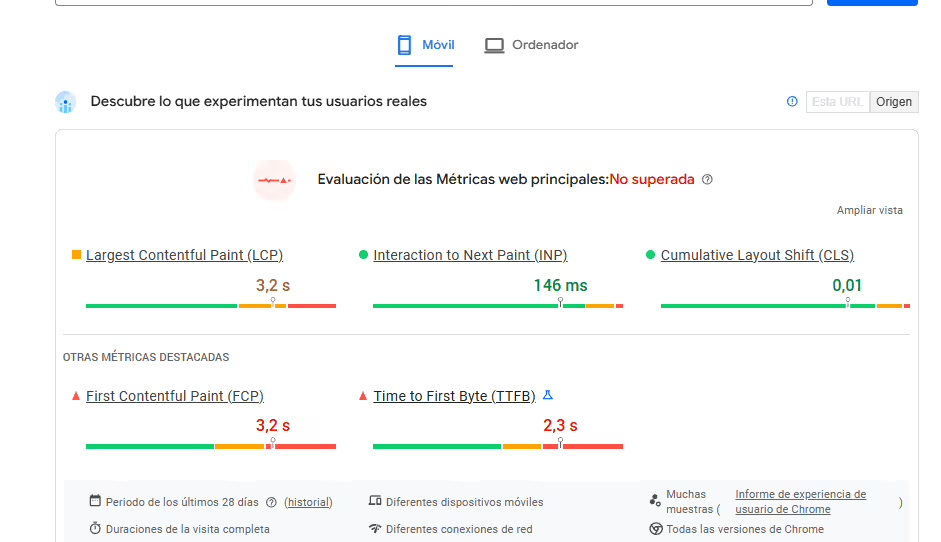
The same page can show a different TTFB even if you analyze it on the same day without having made any changes to the site. The device, the server, and the state of the network can all vary throughout the day, so TTFB is subject to different conditions.
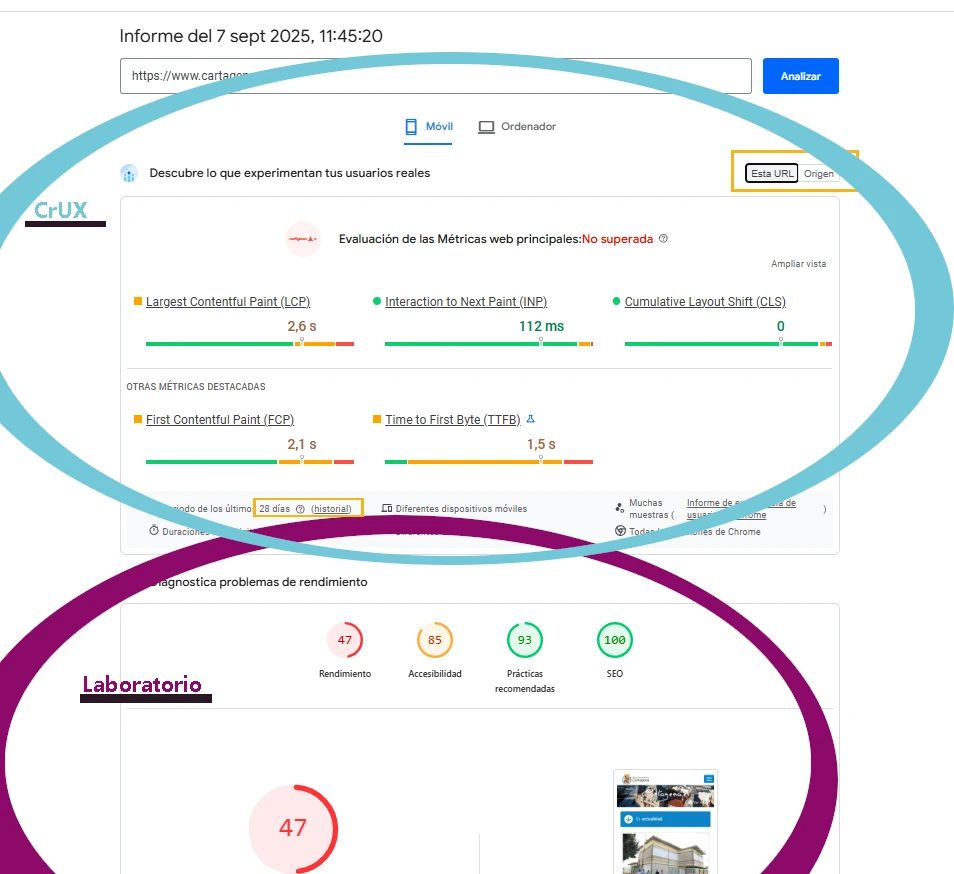
Ideally, you should look at the average. For example, Core Web Vitals (which we can see with PageSpeed Insights) measures the TTFB that users have experienced in Chrome over the last 28 days.
It’s important to keep this in mind: what interests us at the Core Web Vitals level is the CrUX data (highlighted in blue in the following image), and both the lab data (highlighted in purple in the image), as well as the origin or the specific URL, can also give us hints or information about TTFB.
In addition to PageSpeed, to get more precision we can use other complementary external tools to measure this, such as:
I’m going to use Webpagetest as an example, which I like a lot, and I’ll compare the TTFB of two different pages.
When doing a comparative analysis to see whether a website has a good TTFB or not, you must use the same configuration and the same time period. In fact, even if we don’t change anything, analyzing the same website at different times will give us different results.

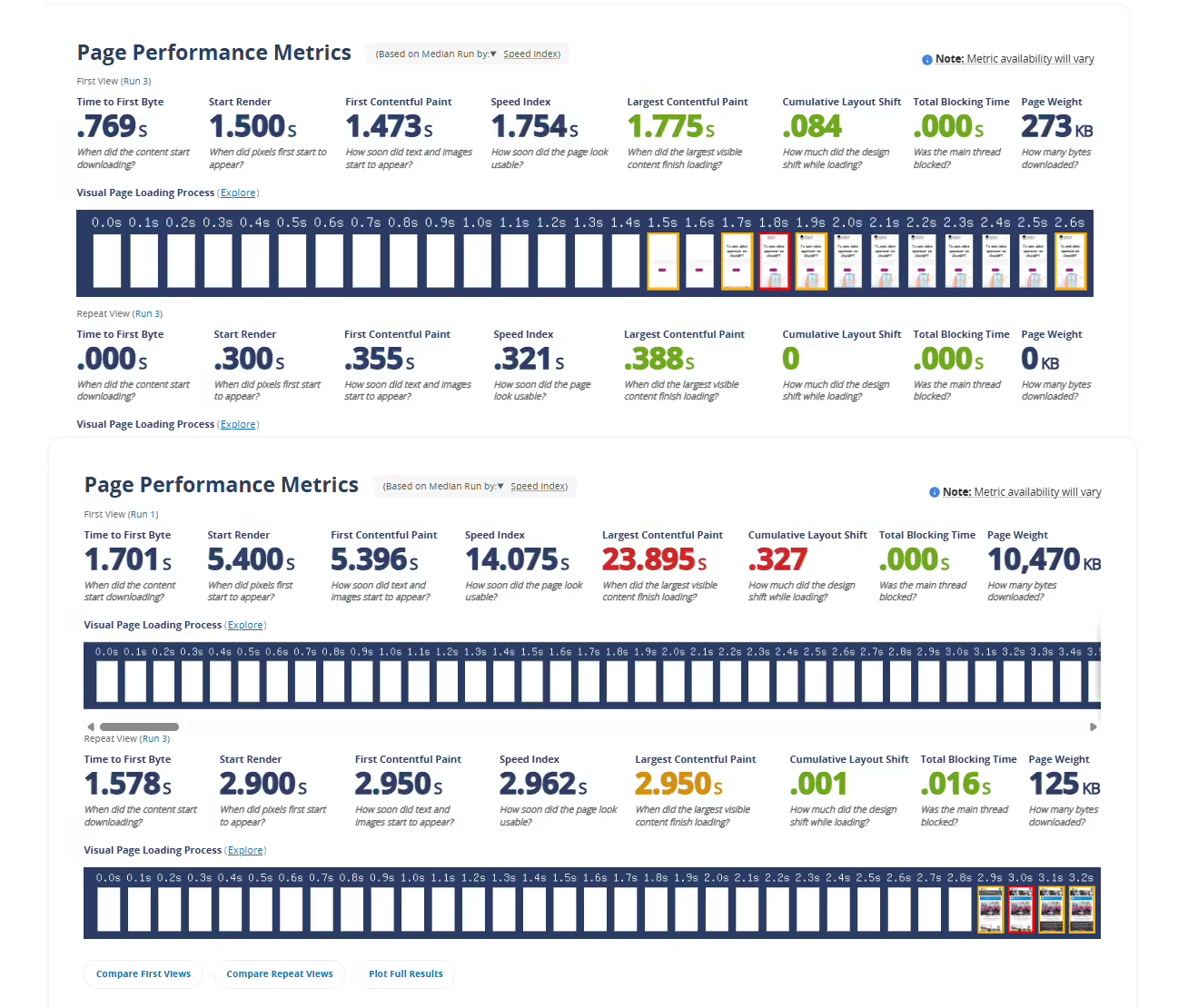
As I mentioned, the results can vary even with the same configuration.
Geohat test results:
Cartagena City h¡Hall results:
Both sites, without having made any substantial changes from one month to the next, show how their metrics have varied. Even though in the Cartagena City Hall case it may look like they’ve cut their LCP in half, as I said, these metrics should be taken as a reference, not as an absolute value. In fact, if you run an analysis on either of these two sites using exactly the same configuration (you just need to click the “Re-Run Test” button), you’ll see that the metrics will be different, even if no changes have been made to the website or the server that would improve or worsen the speed.
You can do this same test with a newspaper or any type of website. The speed of a page, especially the metrics that depend on TTFB and the entire end-to-end chain (DNS lookup, TCP/TLS connection, network latency, initial server response...), is something that varies; it is not static over time. Even if you don’t touch the website.
This means we must focus on improving the average, not a single-point analysis; and a single-point analysis is not enough as an effective KPI.
To diagnose what slows down your TTFB, the logical and quick answer would be to say that it is due to the server or hosting where it is hosted.
However, the solution is not always to pay more; a poorly optimized website can be costly in several ways, and one of these ways is having to overpay for hosting. I remember a virtual classroom that, to operate efficiently (and still had problems), paid €2000 per month for hosting. The reality is that they built a monolithic website where students uploaded files in the same place where they watched their own videos. If you are at the point where you don’t know which hosting to choose, I tell you here what you should consider when choosing a hosting provider and whether VPS, shared hosting, dedicated hosting, or Cloud is suitable for you.
I’ll outline possible causes:
I put this first because it should never be overlooked, both from the business side and the geographical points involved.
If you have an e-commerce site, unless you do a hardware upgrade, it’s possible that during unusual peak traffic times, your website will become more saturated and the server response will be slower. That is why it’s necessary to plan for dates like Black Friday, Christmas, viral campaigns, and big promotions.
This cause is discussed less because it is more marginal and usually affects less, but it is also a real cause of potential traffic drops. Both because of the bandwidth available where your server is, and especially on the client side.
Incidents that may affect your TTFB:
If your website is highly visited at a conference, or let’s imagine it’s highly visited at a festival. In addition to all the people who may want to connect at the same time, mobile data internet will be worse where there are crowds, because there will be more people per antenna.
That is why when you are in a crowded place your coverage and internet performance worsens. If people try to access your website under these conditions, the experienced TTFB will be worse and it may affect your LCP statistics and therefore your Core Web Vitals.
Therefore, if you know your website will be visited by many people under these conditions, depending on the objective, you can prepare an APP for these circumstances or a specific landing page if it is for advertising with a QR. Keep in mind that this is not a controllable factor. In summer, depending on the population sector, people tend to be in more crowded places or, conversely, with lower coverage due to isolation, which can affect your TTFB.
Keep in mind that certain hotels, rural areas, festivals, and overcrowded areas that are not well-prepared can increase latency and therefore TTFB even if your website remains unchanged.
Actually, this last point, just like with crowds, would not be a fault of the actual server TTFB, but in Google statistics it would affect the 28-day average, since people with lower latency would actually access your website and therefore the TTFB statistics would be slower.
The farther the client is from the data center, the higher the round-trip time (RTT) will be. If your hosting is in Madrid without a CDN with multiple POPs or edge nodes, the TTFB of a user in Valencia will probably be much lower than that of a user in Sydney. It is important to adapt the website to the potential target audience.
To everything mentioned, we must add that the quality of operators is not the same, not all offer the same connection quality, the number of users who may use VPNs to view your content, and whether the website is usually accessed from corporate networks.
Who is the target audience of your website and how do they usually browse?
One of the most common causes is poor website configuration. Loops, excessive database calls that can make the content loading extremely slow, etc.
Here the possible causes are as wide and varied as the number of websites in the world, and although I can give you advice and guidance for free if you ask in a comment on my LinkedIn or on my Discord, the reality is that if this is the issue, it usually requires much more time than can be devoted to a free consultation.
If needed, you can book a consultation to diagnose it (the price of the solution would be determined) or find any student from my Technical SEO master’s who 100% knows how to solve the problem. You also have the option to do it yourself and learn to implement it on any website, with very detailed classes and personalized tutoring.
If your website has had many plugins over its lifetime, there may be a lot of junk in the database. If many builders have been used, the website may not be the cleanest in the world.
It may actually be that the server you are on is insufficient for your website, no matter how optimized it is or because of the traffic it receives. In this case, it could be due to the server configuration, as I said regarding the master’s before, or due to the hardware itself.
However, there is a trick you can use to easily diagnose whether it’s the server or the website.
echo 'Hello'; or something simple; if this is also slow, it’s not your website, it’s the server.A common error regarding server issues, before deciding to change hosting, is storage capacity. Make sure you have more than 20–30% free space on your server’s hard drive. If not, you know where the problem may be. This is usually due to uncontrolled backup copies.
If disk space is not the issue, contact your hosting support showing the tests you have performed, demonstrating that the problem is with the server. If they give evasive answers, you may consider changing hosting.
Sometimes it may even be a misconfigured cloud on AWS, Azure, or Google Cloud. Using excessive power doesn’t imply greater efficiency, especially if it’s not configured correctly.
This affects websites that have server-side rendering the most, and in addition to having better-optimized code, it can be alleviated with:
TTFB can affect user experience, can directly affect LCP which is one of the Core Web Vitals metrics and therefore SEO, can affect user experience and even increase bounce rate; even for a large website, it can affect the Crawl Budget itself.
And you? Do you have a good TTFB for your average audience?





I currently offer advanced SEO training in Spanish. Would you like me to create an English version? Let me know!
Tell me you're interested