Crawl budget can affect indexing, ranking, and even eat up your website's rendering.

Note: At my company I’ve encountered large projects with serious crawl issues that were disguised as rendering issues.
Today I’m going to show you how to detect this and possible strategies to fix it. But before we get to that, let’s define Crawl Budget, since it’s quite important to have all these concepts clear. You’ll see how nice this article on crawl budget turned out.
The Crawl Budget is the amount of resources (time, requests, and processing capacity) that Google is willing to dedicate to crawling a website within a given period.
It is made up of two main factors:
Put simply, once Google allocates a certain amount of time to your site (which fluctuates), the crawl budget determines how much of your site it can actually crawl within that window.
For example, Google allocates far more time to Wikipedia than to my website, crawls it more frequently, and dedicates more resources to it. It’s also true that Wikipedia has far more information and updates much more often.
Most websites don’t have problems and Google is usually quite accurate. However, your site may not fall within that majority.
If 80% of what Google crawls on your site is irrelevant, no matter how good the remaining 20% is, the majority of your site is irrelevant.
Unfortunately, Google doesn’t tell you directly whether you have crawl budget issues; however, there are small clues that can help you understand that Google is not able to crawl your site properly, aside from how long it takes for a new page to be indexed. Let’s look at possible symptoms.
In your Search Console, go to the left-hand panel where it says Indexing > Pages. There you’ll see reasons why your pages are not being indexed. This isn’t always negative—it's purely informational. As SEOs, we must learn to distinguish these messages and when to take action.
If you see a message like this, it’s definitely time to act, and I assure you the problem is a lack of crawl budget:

This is similar to the message “Crawled – currently not indexed,” but that one clearly means Google has crawled a number of pages. And Google loves to crawl everything it finds.
If Googlebot doesn’t appear on your site as frequently as it should, you obviously have a crawling problem.
There is an unofficial way to detect crawl budget issues, and you can see it by inspecting an indexed URL with Google Search Console.
To do this, you must go to Page Resources. I’ve attached an image showing how to do it:
Any other reason (robots.txt or response codes) is irrelevant for Crawl Budget. Also ignore resources that do not belong to your domain (unless they are essential for your content).
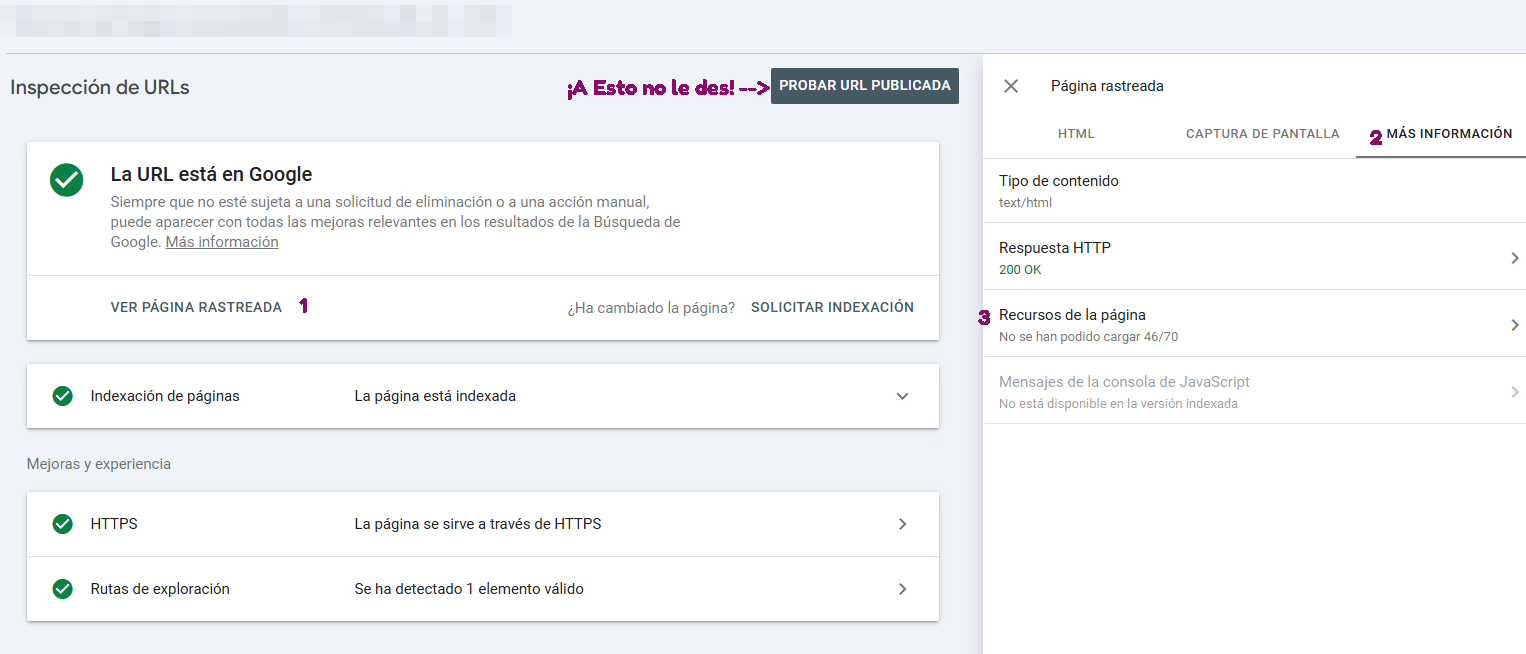
When should you worry?
When the well-known “Other error” message appears and it comes from your domain or your CDN. In those cases, my friend, you have Crawl Budget issues and it’s possible that your images, JS, or CSS are not being retrieved. Analyze how important those unavailable resources are.
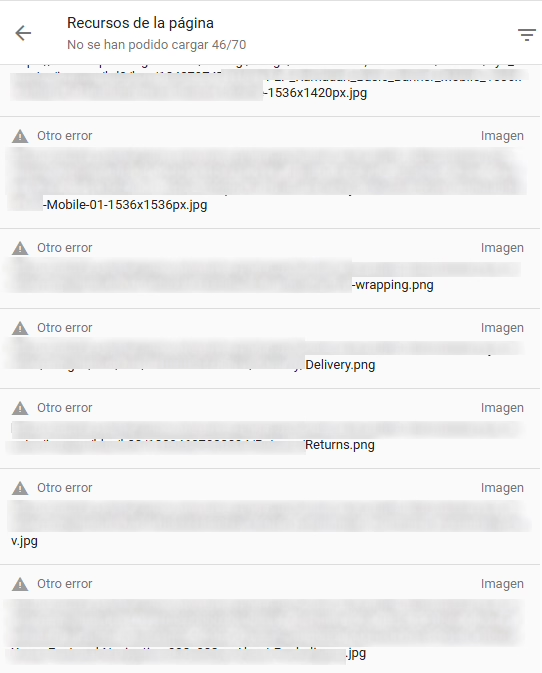
Having a low Crawl Budget, although uncommon especially in small projects, is not a minor issue. It can mainly prevent pages from being indexed — and without indexing, there is obviously no ranking.

It’s possible that if Google starts considering your website irrelevant and reduces crawling, some of your content may end up being deindexed.
If you have a Crawl Budget issue, indexing new content will be slow — no matter how many times you hit “Inspect URL” in Search Console, use the almighty Indexing API, or submit it in your sitemaps.
If you look at the graph above, you can see that rendering happens after crawling. It’s possible that even if a page passes the crawl stage, not all files do. Sometimes the JavaScript file is dynamic. If that’s the case, you’ll face the serious problem of Google not rendering your site properly because critical JS is missing, which creates a vicious cycle causing your high-quality content to be treated as thin content (because Google is missing information it should have received).
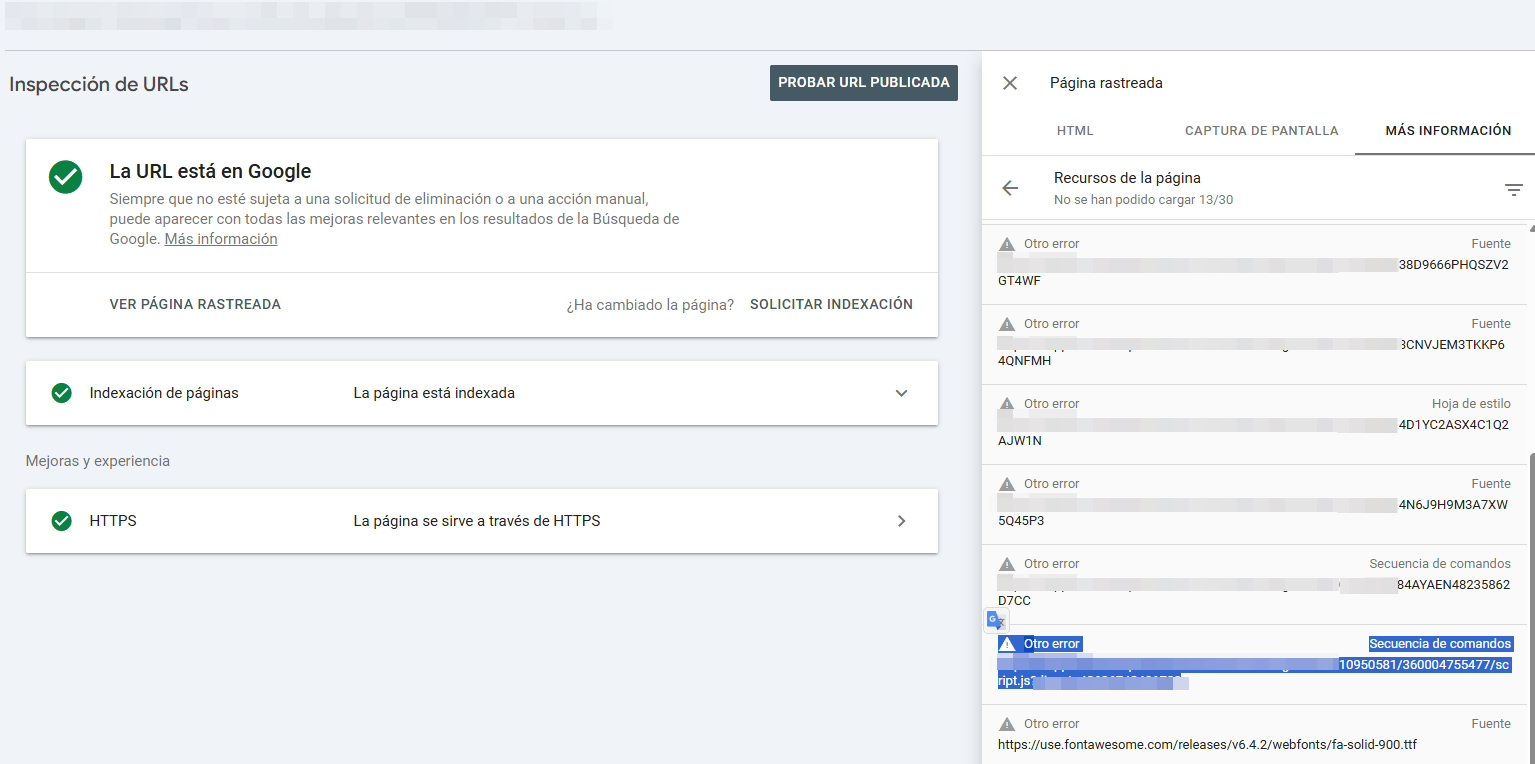

If when inspecting indexed pages without clicking “Test Live URL” (this is very important, because checking in real time is not the same as checking what Google actually did), you see the message “Other error”, it may be due to a crawl budget issue that is preventing Google from crawling the resources.
In some cases, this may be irrelevant — but it can destroy a project if what Google fails to crawl is page-specific JS that generates essential dynamic content, resulting in an exorbitant amount of files that Google simply cannot process on large websites.
In these cases, Google may crawl the page but fail to see the content it should see. A silent problem that can kill huge websites.
In this situation, you must make drastic and possibly risky decisions — but still less risky than letting the site collapse in Google’s eyes.
SEOs usually defend SSR at all costs when dealing with JS frameworks and their rendering. We love to talk about its advantages and about hydration performance. But these are the most common issues:
Especially when using:
This produces different JS for each page, sometimes with request-specific hashing (say goodbye to your crawl budget).
In SSR/ISR mode with hydration: It generates JS chunks unique to each route, especially with getServerSideProps. Each page can end up with its own dynamic bundle.
Nuxt generates:
If you use server middleware, nuxt generate, nitro, etc., you may be returning assets with low expiration times.
For example: Hydration payloads (_payload.js) are unique per page.
It generates heavy hydration bundles and, depending on how creative (or reckless) the developer is, may end up producing page-unique bundles.
It generates route-specific JS modules with dynamic hashes.
Even though it’s SSG, Gatsby:
If you publish frequently → Google attempts to render, and the JS no longer matches.
All of these frameworks are still valid for SEO, but they should always be supervised by a professional SEO team—especially if the project is important.
Warning: Crawl Budget is not a direct ranking factor — meaning that having a page indexed will not improve its rankings. But it can help with indexing pages when parts of your site are not appearing in Google.
That said, if Crawl Budget prevents certain crucial JS files from being crawled, this can impact rendering, which does affect rankings.
Once we detect the problem, the possible causes can be almost as many as websites exist, so here is a list of potential reasons for having a poor crawl budget:
Tip: If you have a very large website that updates relatively infrequently and you are about to perform a massive update — for example, a migration — consider doing it in stages so that Google can process the change more effectively. (This is never a problem for small sites or sites that update frequently.)
It’s also important to honestly determine whether your crawl budget problem comes from Google not allocating enough resources to crawl your high-quality content, or because a large portion of your site is so irrelevant that Google struggles to crawl it efficiently.
Strategies to avoid crawl budget issues always involve some risk, and they should be implemented under the supervision of a professional.
If you apply solutions like a broad Disallow for all irrelevant content, you may see something like this in Search Console:

The fact they aren’t being indexed is a good sign — and the fact they aren’t being crawled is even better. It means Google can now focus its resources on the pages that matter.





I currently offer advanced SEO training in Spanish. Would you like me to create an English version? Let me know!
Tell me you're interested